You’ve been invited by an organization that uses Temperate. You only see what they ask of you and share with you.

Accept the invitation

Open the link in the email. If you’re new, select Create an account to accept. If you have an account, select Sign in to accept. If the invitation has expired, ask your contact for a new one.

Sign in

You sign in with a link, without a password. On the sign-in page, select A guest? Sign in with a link by email, fill in Email, and open the link within 15 minutes.

Home

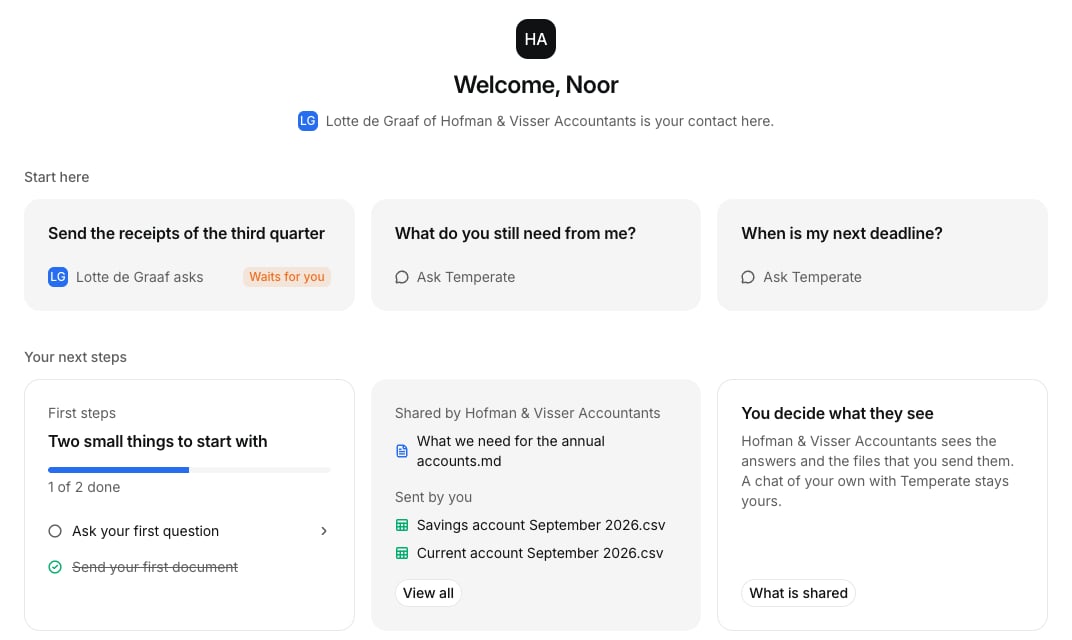
The home of a guest: what waits for them, their next steps and what is shared
Home shows your contact, the tasks waiting for you, and the files shared with you.

Answer a task

Each task is a chat that starts with a question. Write your answer or select the plus to add a file. Temperate tells you what’s still missing. The organization can read this chat. If a task waits, you get a reminder after 3 days.

Your own chats

Select New chat to ask Temperate anything. The organization can’t read these chats, but what you say can teach their memory, unless you use a private chat. Each chat tells you this.

Files

Files shows what’s shared with you and what you sent.

Notices

You see a dot in the app when something needs you, and you get an email if you don’t open it in time.