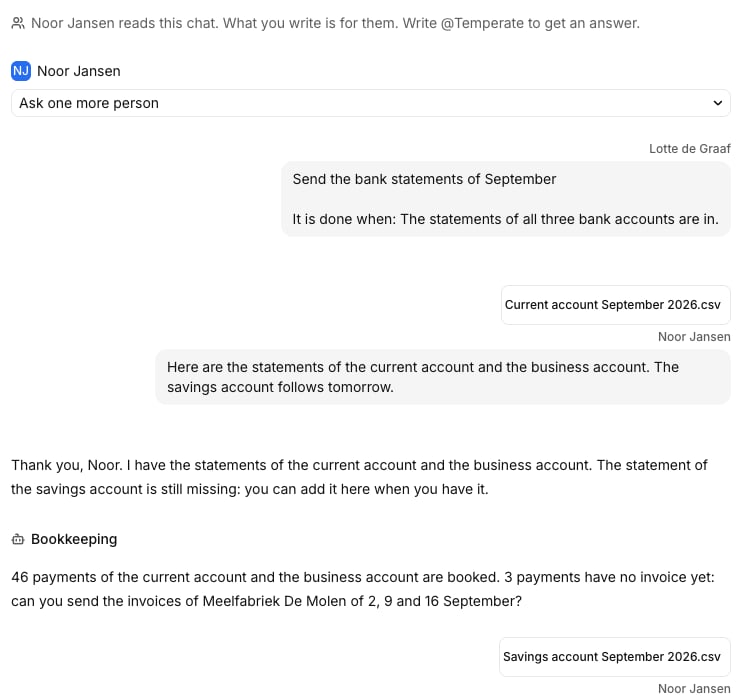
Give a guest a task, and they answer it in a chat. Temperate tells them what’s still missing, and gives the task back to you when everything is in.

Give a guest a task

1

Start

On Tasks, select New task.
2

Say what you need

Fill in Title, such as “Send the September bank statements”, and a Goal: “The statements of all three accounts are in.”
3

Choose who answers

Under Owner, choose a guest. Optionally, make it repeat.
The guest gets a notice in the app and by email.

The chat

The chat of a task: the question, the answer of the guest with a file, and the answer of Temperate
The guest writes and adds files, and Temperate answers them. Your organization can read this chat. If you write there, Temperate doesn’t reply unless you type @Temperate.

Reminders

If a guest stays silent for 3 days, Temperate reminds them, up to 3 times, and then tells you. To remind them now, open the task and select Remind now.

Ask more people

On the task, select Ask a guest to add someone. A guest can also add a colleague.

Check and close

When the guest has answered, the task shows For you to check. Check it and move it to Done. To let an agent act on what a guest sends, see Triggers.